
30 days free
Try Mileage Registration with Premium
I built these tools for my own shoots, and you're welcome to use them for yours. With Premium, you get the whole lot, plus extra features in the free tools. Create a free account and try it all free for 30 days, starting straight away.
- All 61 tools, including every Premium tool
- Save your shot lists, checklists and selections
- Plan shoots and log locations with GPS
- Get an AI review of your photography website
- Extra features in the free tools
- Try new tools first
No credit card. Premium stops automatically. Free tools keep working.
Premium afterwards: €2.99 a month or €19.99 a year.
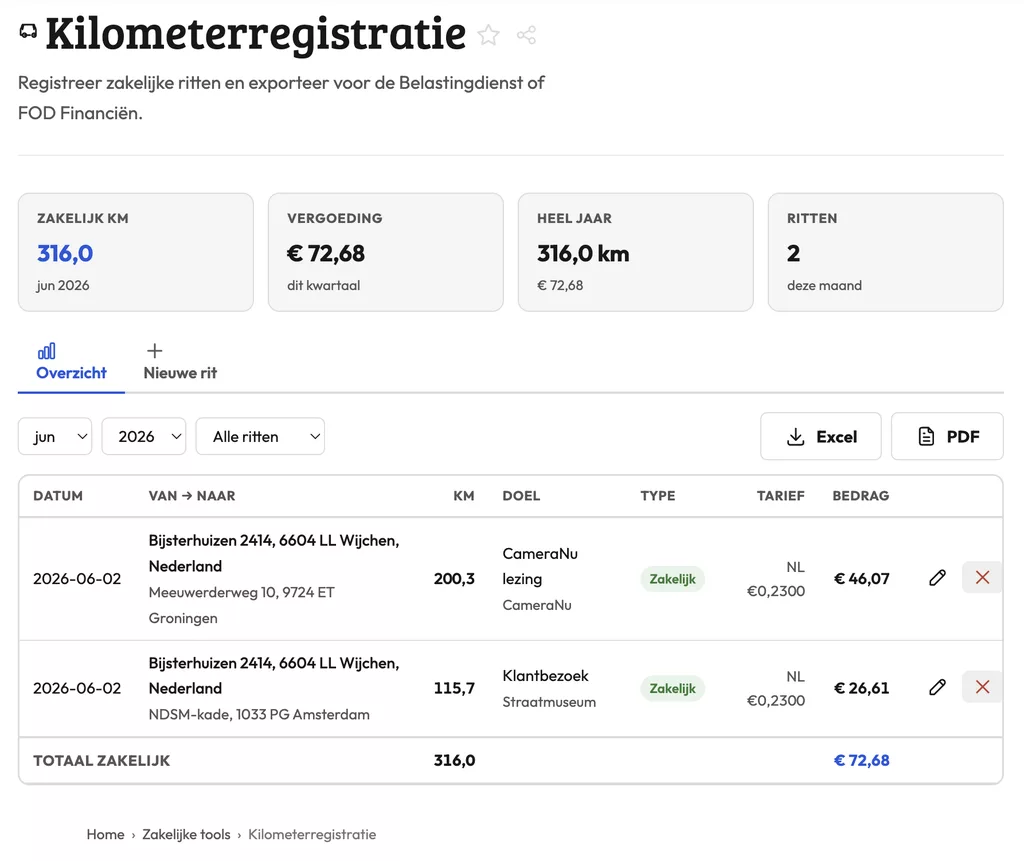
Mileage Registration: how it works
The mileage registration tool lets you log business trips and export a clear overview for your tax return. If you shoot on location regularly and use your own car, this keeps your records clean and ready when you need them. Enter the date, departure point, destination and distance for each trip, and the tool builds an exportable log.
What tax authorities expect from your mileage records
To deduct business mileage or process reimbursements, you need a complete logbook. That means date, start and end address, purpose of the trip and the number of kilometers (or miles). A note in your phone or a rough estimate will not hold up.
The export this tool generates includes all required fields. Whether your accountant wants a pdf or a csv depends on the software they use, so check that before you start logging.
How mileage adds up for photographers
A wedding photographer driving to a different venue every weekend. A product photographer commuting to a rented studio. A press photographer out on assignment daily. The distances stack up fast, and reconstructing them at year-end from memory is a headache you can avoid.
Logging each trip right after you drive it takes under a minute and keeps your administration current. That makes quarterly and annual filing a lot less painful.
Frequently asked questions
Can I log the drive from home to a shoot location as a business trip?
If you work from home and travel to varying locations, that drive is generally considered business mileage. Check with your accountant to confirm this applies to your specific situation.
How do I export my mileage log for my accountant?
Use the export button in the tool to download a file with all logged trips. Hand it to your accountant or import it directly into your accounting software.
How do I handle a trip with multiple stops, like a shoot followed by a client meeting?
Log each leg as a separate entry. That gives you a transparent record and matches what most tax authorities expect to see.
Mileage Registration: how it works
The mileage registration tool lets you log business trips and export a clear overview for your tax return. If you shoot on location regularly and use your own car, this keeps your records clean and ready when you need them. Enter the date, departure point, destination and distance for each trip, and the tool builds an exportable log.
What tax authorities expect from your mileage records
To deduct business mileage or process reimbursements, you need a complete logbook. That means date, start and end address, purpose of the trip and the number of kilometers (or miles). A note in your phone or a rough estimate will not hold up.
The export this tool generates includes all required fields. Whether your accountant wants a pdf or a csv depends on the software they use, so check that before you start logging.
How mileage adds up for photographers
A wedding photographer driving to a different venue every weekend. A product photographer commuting to a rented studio. A press photographer out on assignment daily. The distances stack up fast, and reconstructing them at year-end from memory is a headache you can avoid.
Logging each trip right after you drive it takes under a minute and keeps your administration current. That makes quarterly and annual filing a lot less painful.
Frequently asked questions
Can I log the drive from home to a shoot location as a business trip?
If you work from home and travel to varying locations, that drive is generally considered business mileage. Check with your accountant to confirm this applies to your specific situation.
How do I export my mileage log for my accountant?
Use the export button in the tool to download a file with all logged trips. Hand it to your accountant or import it directly into your accounting software.
How do I handle a trip with multiple stops, like a shoot followed by a client meeting?
Log each leg as a separate entry. That gives you a transparent record and matches what most tax authorities expect to see.